Draw it,
time it,
hand it off.

From thumbnails to animatic, in one app. Draw your panels, set the timing, move the camera and watch it as an animatic — then hand it off as a print-ready PDF or as files your editor can open.

Windows · iPad · Android tabletsComing soon

The Last Train · S#1 Country station / Night24 fps
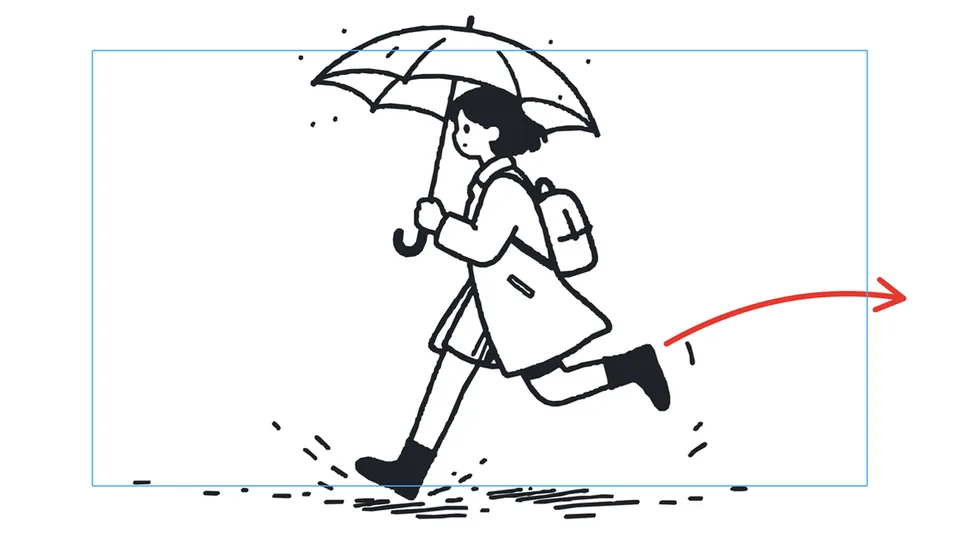
SH022s
Black-and-white storyboard panel: a girl with an umbrella runs right, splashing through puddles. A red arrow shows her direction.
(out of breath) Almost… almost there!Sujin runs through the rain, umbrella in hand, splashing puddles.
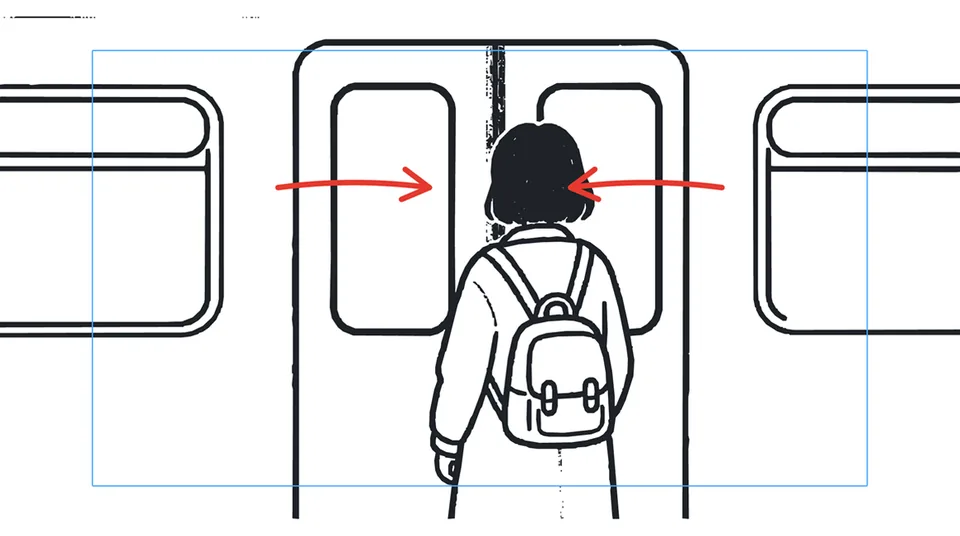
SH032s
Panel seen over the girl's shoulder as the train doors close from both sides. Two red arrows mark the doors' movement.
No, wait! Please!Over Sujin’s shoulder, the train doors slide shut.
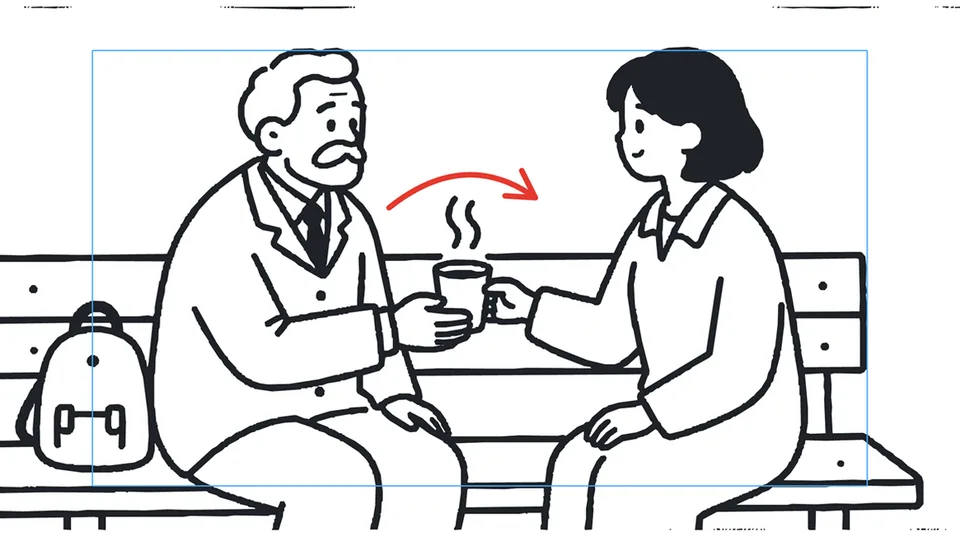
SH082s 12f
Panel: an old stationmaster on a bench hands the girl a steaming paper cup.
STATIONMASTER: Drink it while it’s hot. A freight train’s coming.He hands her a steaming paper cup.

Sample project “The Last Train” — 10 panels · 24.5 s

From a blank panel to the edit suite, in four steps

Built around the way boards are made in film, animation and commercial pre-production. No shuttling files between apps.

SH01

Draw — vector lines you can fix later

Every stroke is a vector, so nothing breaks when you resize. You can even change the thickness of lines you have already drawn.

  • Brush, pencil and eraser, shapes, paint, cutter, stamps and text
  • Layers and groups, opacity and blend modes
  • Light table and onion skin
  • Works with a mouse; a pen tablet makes it nicer
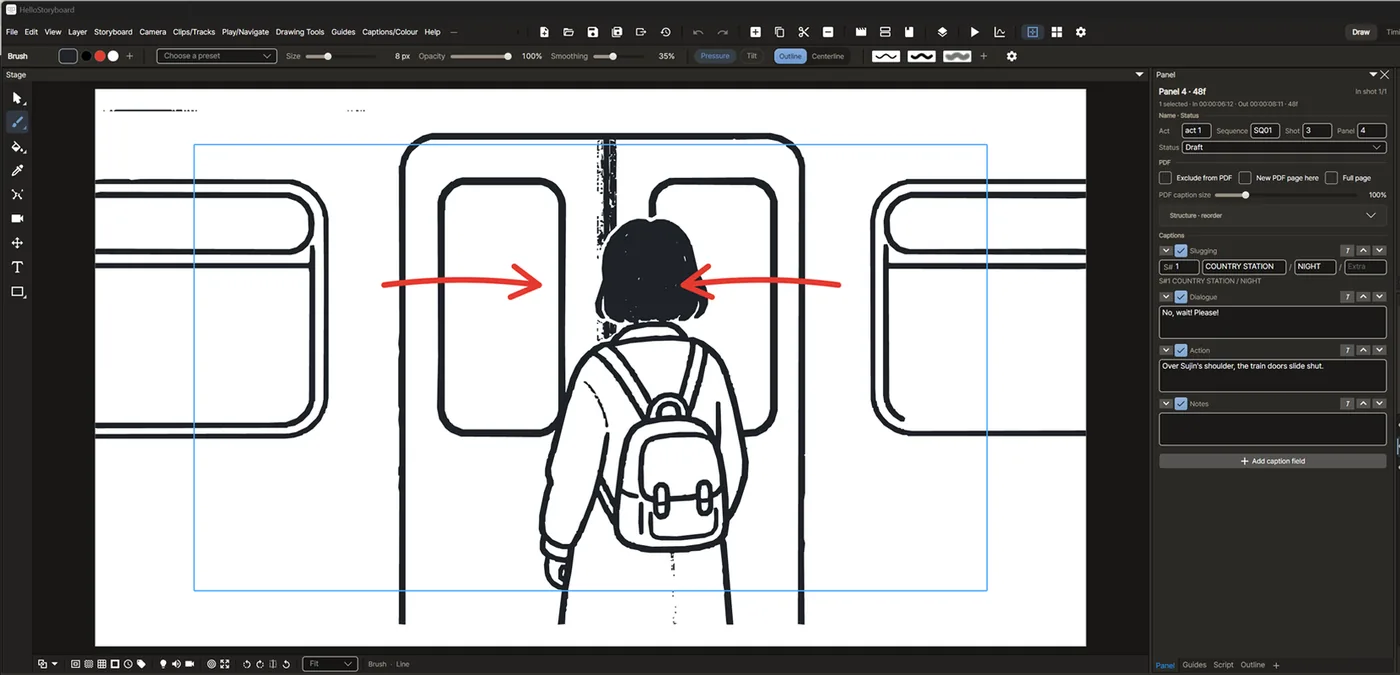
HelloStoryboard drawing view: tool bar on the left, a girl at the train doors on the canvas, brush size and opacity controls across the top.
Drawing view · Windows
SH02

Time — every panel, to the frame

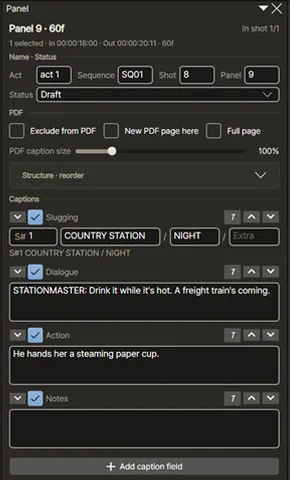
Break the story into acts, sequences, shots and panels, then set each panel’s length on a frame-accurate timeline. Captions hold the slug line, dialogue, action and notes — and you can add your own fields.

  • Frame-accurate timeline with markers
  • Slug (S# · location / time), dialogue, action and note captions
  • Audio and video reference tracks
Panel properties: act, sequence, shot and panel numbers with slug, dialogue, action and note fields.
Panel captions
Timeline with panel thumbnails SH02 to SH08 laid out by duration, and two audio tracks below.
Timeline · 10 panels · 00:00:24:12
SH03

Camera — push in, pull out, pan

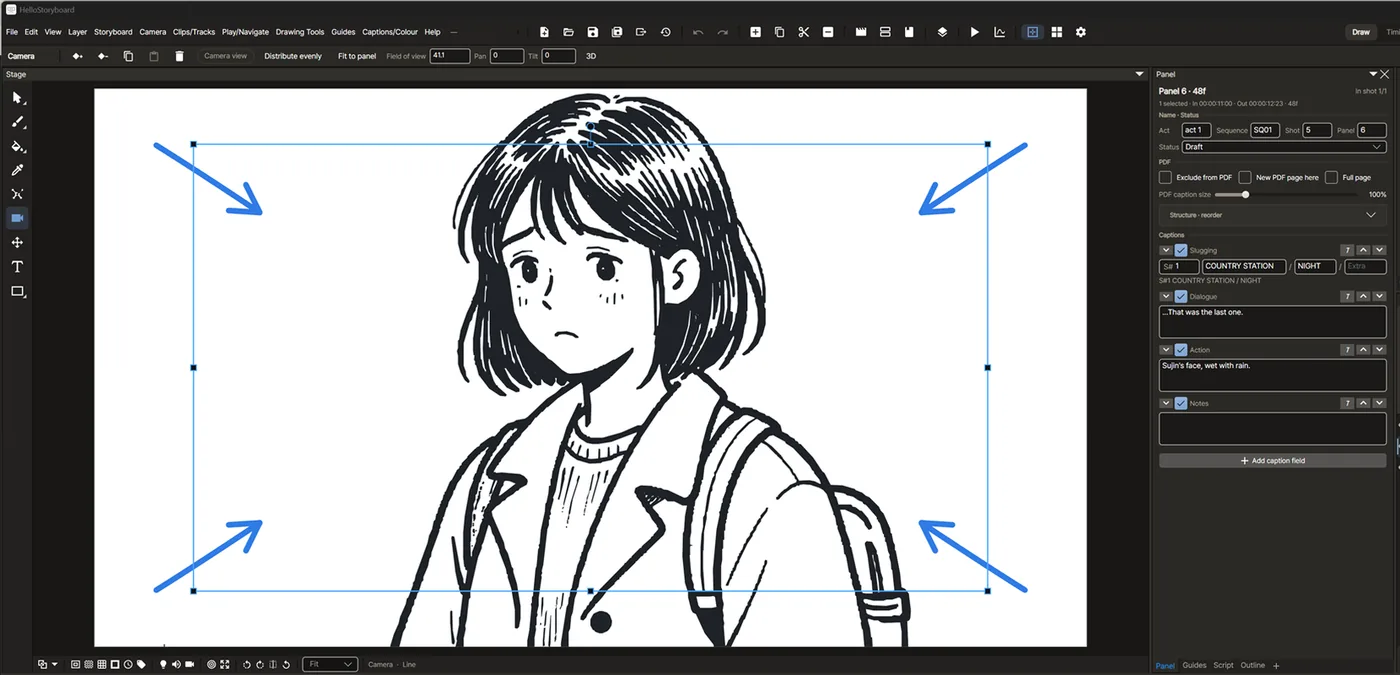
Place a 2D camera frame on the panel, set keyframes, and it moves. Hit play and your boards become an animatic.

  • Camera keyframes — push in, pull out, pan
  • Layer transform animation
  • Instant animatic playback
Camera tool: a blue camera frame over a close-up of the girl, with four arrows pointing inward.
Camera keyframes · push in
SH04

Hand off — in files people can open

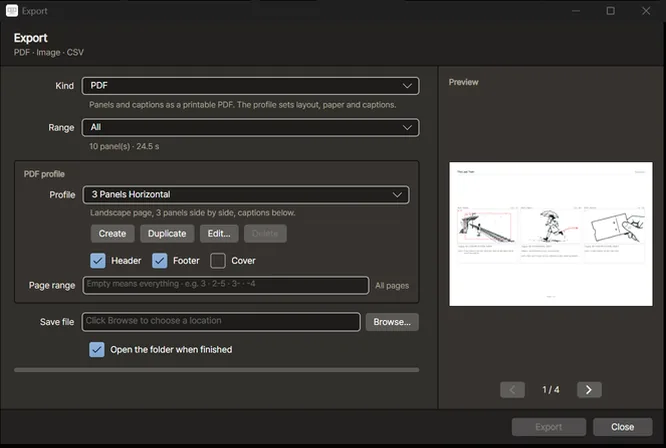
A PDF for whoever prints, a cut list for the editor, a video for the meeting room. PDF profiles set layout, paper and captions, with a live preview.

  • PDF — profiles and live preview
  • Video — MP4 and WMV (MOV and ProRes with ffmpeg installed)
  • Final Cut XML and EDL
  • PNG, JPEG and Targa, layered Photoshop (.psd), shot layouts, CSV
Export window: type PDF, profile 3 Panels Horizontal, with a page preview showing three panels side by side.
Export · PDF profile preview

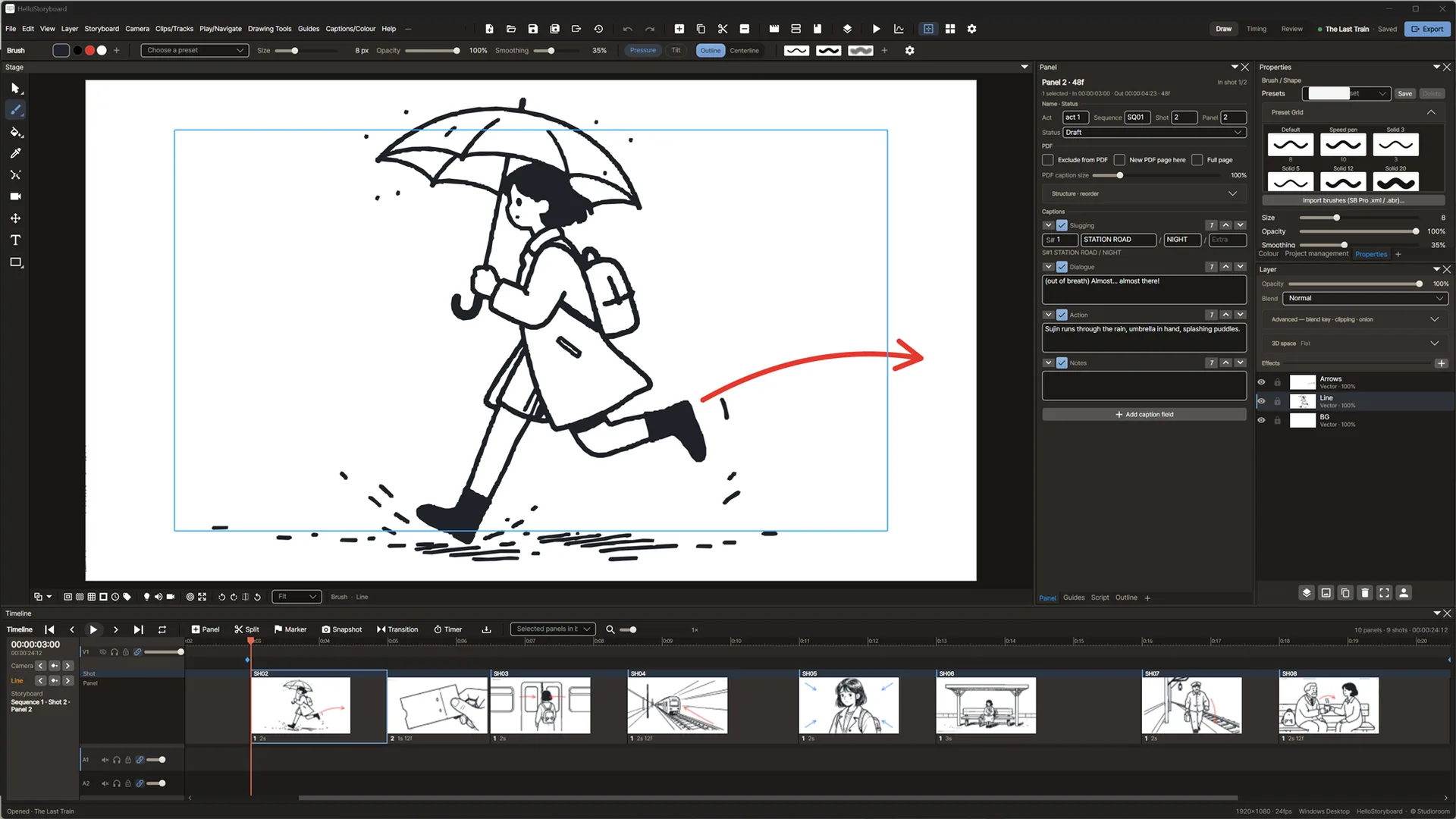
From menu bar to timeline, on one screen.

Fix a line of dialogue while you draw, then retime the panel without leaving the window. Stack panels as tabs or tear them off, and save the layout you like as a workspace.

The full HelloStoryboard workspace. A girl with an umbrella runs across the canvas; panel captions, brush presets and layers sit on the right, and a timeline of panel thumbnails with two audio tracks runs along the bottom.
Windows · 1920×1080 · sample “The Last Train” SH02
  1. Menus and toolbarThirteen menus, File to Help. Over 300 commands you can put on a shortcut.
  2. Tool barSelect, brush, paint, eyedropper, cutter, camera, move, text, shapes.
  3. StageRotate, flip, zoom. Guides, perspective lines and the symmetry axis live here.
  4. Panel properties and captionsNumbering, status, slug, dialogue, action and notes for every panel.
  5. Brushes and layersPick from the preset grid; set opacity and blend per layer.
  6. TimelinePanel durations, camera keys, markers, audio and video tracks — frame by frame.

It does this.
And that, too.

More than 570 menu items. Everything the four steps above couldn’t fit, laid out in the order you work.

SH01Draw

Drawing tools

  • Brush · pencil · eraser
  • Select · select by colour
  • Cutter: lasso, rectangle, gesture
  • Point and Bézier editing
  • Rectangle · ellipse · line · polyline
  • Arrows: 5 heads, 3D, bend
  • 5 balloon styles: thought, shout, whisper
  • Text, and text to strokes
  • Stamps: your own, or cycling through drawings
  • Paint · close gaps · lasso fill
  • 6 gradient types
  • Eyedropper

Brush engine 73

  • 73 presets: pencil, ink, marker, brush, airbrush, tone
  • 33 procedural tips and paper grain
  • Dual tip with blending
  • Flow · taper · fade
  • Pressure curve editor
  • Tip angle from pen tilt and azimuth
  • Stabiliser: average or pulled string
  • Outline brush that bakes strokes into shapes
  • Import .abr · .tbr · .xml brushes
  • Tool presets with shortcuts

Vector editing

  • Change line weight after drawing
  • Non-uniform scale · skew · perspective
  • Simplify · merge strokes
  • Brush strokes ↔ pencil strokes
  • Edit several panels at once
  • Project colours: change one, every stroke in it follows

Guides and symmetry

  • Horizontal, vertical, diagonal guides with snapping
  • 1-, 2-, 3- and 4-point perspective
  • 5-point fisheye
  • Isometric 30° · 45°
  • Ruler mode
  • Horizontal and vertical symmetry
  • Action and title safe, thirds, field chart

Layers 17

  • Vector · bitmap · image · text · group · 3D object
  • 17 blend modes
  • Clipping masks · auto-matte
  • Keyframable effects: blur, radial blur, brightness, saturation, hue
  • Bitmap resolution 0.5×–4×
  • Exclude from export or onion skin, pin to camera
  • Light table

SH02Story and time

Story structure

  • Sequence ▸ scene ▸ shot ▸ panel, with an outline tree
  • Smart add panel that copies only the layers you pick
  • 7 shot templates: OTS, two-shot, CU, MS, FS, wide, insert
  • Reverse panel
  • Reframe
  • Renumbering and naming rules
  • Panel colours and status: draft, review, approved, locked
  • Thumbnail pages split into panels
  • Library: 10 mannequin poses, 10 props
  • Pitch mode for presenting

Captions and script

  • Slug · dialogue · action · notes
  • Custom caption fields
  • Shot-list fields: size, angle, lens, move
  • Import Final Draft (.fdx) scripts
  • One panel per line of dialogue
  • Time panels to dialogue length
  • Spell check
  • Handwritten captions
  • Update captions in bulk from CSV

Timeline and playback 9

  • Frames or timecode, with a start offset
  • 9 transitions: dissolve, fade, wipe, iris, push…
  • Markers and loop range
  • Ripple edit · animatic edit mode
  • Panel timer: tap out durations while it plays
  • Pre-rendered high-quality playback
  • Dialogue and timecode overlay while playing
  • Onion skin
  • Resolution presets: 1080p, 4K, 2K, square, vertical 9:16

Audio

  • Unlimited tracks, mute and solo
  • mp3 · wav · m4a · aac · ogg · flac
  • Cut and trim on the waveform
  • Volume envelope · fades · normalise · speed
  • Record sound, voice notes per panel
  • Snap camera keys to sound
  • Audio levels, WAV mixdown
  • Temporary dialogue voice (TTS)

Video reference

  • Multiple video tracks: mp4, mov, avi, mkv…
  • Above or below the drawing, with alpha handling
  • Trim and transform keyframes

SH03Camera

Camera and animation

  • Push in · pull out · pan · rotate
  • Edit the motion path on the stage
  • 5 easings, per-key Bézier, a function-curve editor
  • Copy keys, spread them evenly, run them across panels
  • Layer transform animation with pivots
  • 3D space: depth, parallax, free view
  • OBJ 3D model layers with posing

SH04Hand off

Import

  • png · jpg · bmp · gif · webp
  • PSD with layers
  • PDF: a new panel per page
  • Vectorise line art
  • SVG as editable vectors
  • OBJ · FDX · CSV · palettes
  • Numbered images in one go

Export 10

  • 10 PDF profiles and a profile editor
  • Paper, caption layout, cover, header, camera paths, greyscale
  • Preflight check before export
  • MP4 · WMV and image sequences (MOV · ProRes with ffmpeg installed)
  • Burn in timecode, names, subtitles; transparent background
  • Final Cut XML · EDL
  • PSD with layers
  • Shot layouts covering everywhere the camera travels
  • CSV · WAV
  • sRGB · P3 · Rec.709 · Rec.2020 colour spaces

+Review it, keep it safe

Review and revision

  • Review-note pins with an open-note count
  • Reviewer mode that can only edit notes
  • Pull just the notes from a returned file
  • Revision layers · track changes
  • PDF of changed panels only
  • Revision summary PDF
  • Before/after compare
  • Split and merge projects

Projects and safety

  • .hboard folder or single .hboardpk file
  • Autosave and automatic backups
  • Restore from a backup you can preview first
  • Crash recovery
  • Named versions
  • Relink assets

Workspace 300+

  • Dockable panels: tab, split, tear off
  • Save and switch workspaces
  • Shortcut editor: 300+ commands
  • Hold a key to switch tools temporarily
  • Rotate and flip the stage
  • Dark theme, adjustable accent
  • English · 한국어

This list describes the Windows version. Numbers are counts of what ships in the app (presets, blend modes, transitions, PDF profiles, shortcut commands).

On a tablet, with your fingers.

iPad and Android tablets get their own screen. Menus move to a wheel you open with a long press, and the moves you make all day become finger gestures.

  • WindowsSteam
  • iPadApp Store
  • Android tabletGoogle Play

The tablet versions are coming soon. Their feature set may differ from the Windows version; each store page will list what’s included at launch.

Autosave, backups and crash recovery. On from the first launch.

No internet connection, no account. Your projects stay on your device and are never uploaded anywhere.

Specs

Platforms
Windows 10 and 11 (64-bit) · iPad · Android tablets — coming soon
Languages
English, Korean
Internet · account
Not required — fully offline
Export
PDF · MP4 · WMV · MOV/ProRes (needs ffmpeg) · Final Cut XML · EDL · PNG · JPEG · Targa · PSD · CSV
Windows minimum
Windows 10 64-bit · x64 dual-core 2 GHz · 4 GB RAM · DirectX 11 · 500 MB storage
Big projects
A 1,000-panel project opens in about 1.7 seconds (internal measurement)
Windows recommended
Windows 11 64-bit · x64 quad-core · 8 GB RAM · dedicated GPU · 1 GB on SSD · pen tablet

Screens and features on this page are from the Windows version. The iPad and Android versions may differ; each store page will list what they include at launch.

Questions

When and where can I get it?

The Windows version is headed to Steam, and the tablet versions to the App Store and Google Play. Ask for a launch notice and we’ll email you the day it opens.

Do I need a pen tablet?

No — you can draw with a mouse. For long sessions we do recommend a pen tablet or pen display.

Do the tablet versions have the same features?

They use the same project format and have their own touch-first screen. Their feature set may differ from the Windows version, so each store page will say exactly what’s included at launch.

Can I move projects between devices?

Yes. Copy the project file (.hboard). Nothing syncs automatically, so back up important projects yourself.

How do I get in touch?

Email contact@studioroomkr.com in English or Korean. We usually reply within two business days. There’s also a support page.

One email, the day it opens.

Notify me at launch